
Light Theme Portfolio Website
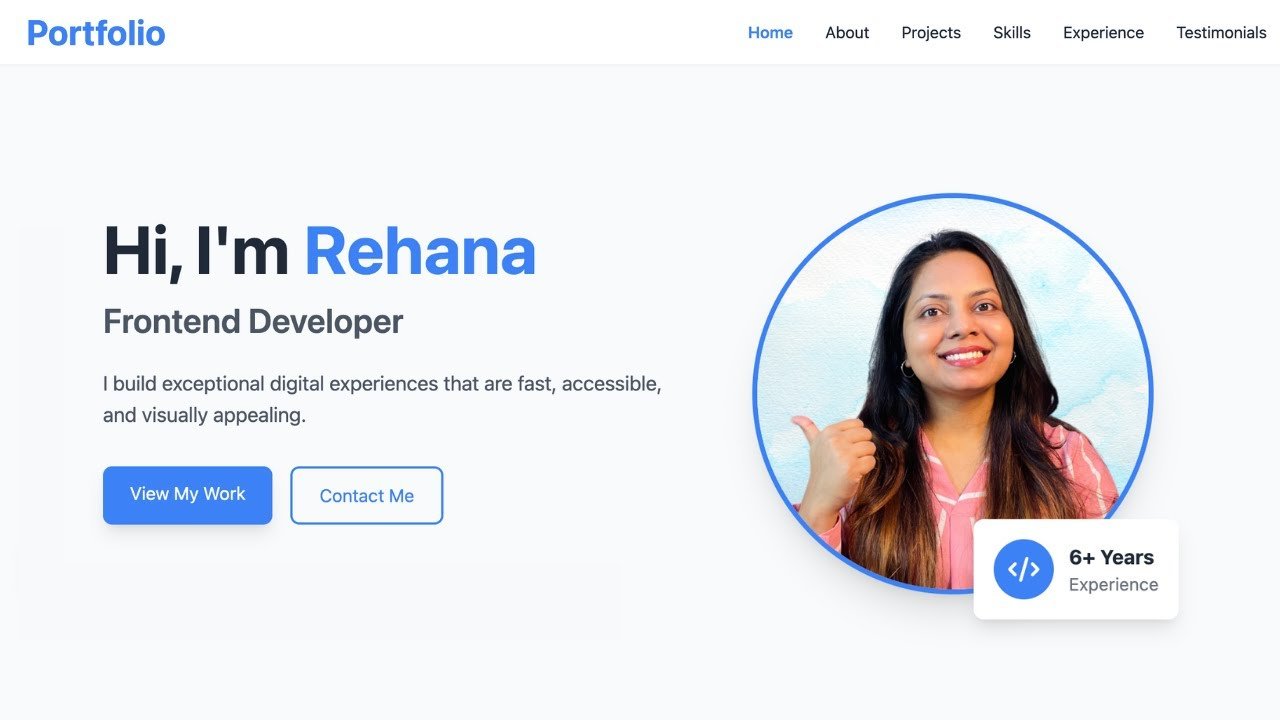
Project Overview
The Light Theme Portfolio Website is a clean and professional site designed to showcase developer’s skills, projects, experience, education and professional journey. This website uses a modern look for the Light Theme Portfolio so that all the content stays easy to read and simple to explore.
This Portfolio Website puts all the professional details in one single spot. Visitors can get to know about the developer by looking through the About Me, Projects, Skills, My Journey, Education, Client Testimonials and Contact sections. The Light Theme Portfolio Website also puts a spotlight on projects and technical skills which helps people see exactly what the developer can do.
Because of the responsive layout you can use the website on any kind of screen. Its organized structure also makes it suitable for developers who want to present their work and build a professional online presence.
Purpose of the Project
The purpose of this website is to build a professional online platform where a developer can show their background, technical abilities, projects, education and work experience. The website offers visitors a look, at the developer’s professional profile. For example they can see projects find out about technical skills track the developer’s career path and read feedback from clients.
Moreover, the project demonstrates how frontend technologies can be used to make a website that works well on all devices and looks good. It can also help students and developers learn how to put information into different parts of a site while keeping the experience the same for everyone who visits.
How the Website Works
This website is a single page portfolio that lets visitors navigate through sections using the navigation menu. Each section shares details about the developer and the developers professional journey. Visitors first explores the introduction and About Me section to learn about the developer. Next, they can view featured projects, examine the technologies and work involved in each project.
The Skills section lists abilities in different categories, My Journey and Education sections give details about academic backgrounds. Visitors can also read testimonials to learn about other peoples experiences with the developer. Finally the Contact section offers a way for the visitors to get in touch. Together these sections forms an online profile that presents the developer’s work and experience in a structured manner.
Website Sections
- Hero Section: This section introduces the developer and a short summary of their professional role is presented. It gives a clear first impression to visitors and encourages them to look further in the portfolio.
- About Section: This section describes the developer’s background, interests and professional profile. This section allows visitors to know who the developer is and what they focus on.
- Projects Section: In this section developer displays his finished projects here. Visitors can explore the developer’s hands-on experience in projects.
- Skills Section: This section presents the developer’s technical abilities in a structured way. It includes different skill categories such as frontend development, backend development, databases, and development tools.
- My Journey Section: This section highlights the developer’s professional journey and important experiences. It helps visitors understand how their skills and career have developed over time.
- Education Section: In this section developer’s educational background is presented. It provides the information about their academic journey and qualifications.
- Client Testimonials Section: This section features reviews from clients or people who have worked with the developer. The testimonials offer an overview of the developer’s work and professional relationships.
- Contact Section: Visitors can contact the developer by using this section. It can be used for professional inquiries, discussions about projects or other messages.
- Footer Section: The footer provides additional navigation and useful links. It also helps visitors access important information after reaching the end of the portfolio.
Technologies Used
- HTML5: HTML5 creates the structure and organizes sections such as About Me, Projects, Skills, Journey, Education, Testimonials, and Contact in this project.
- CSS3: CSS3 is used for styling the website, It handles the light theme, layouts, spacing, typography, responsive behavior, cards, buttons, and other styling elements.
- JavaScript: Used to add interactivity and dynamic functionality, such as handle navigation, user interactions, and other dynamic elements that improve the browsing experience.
Key Features
- Light and Clean UI: This site features a bright and professional interface that makes content easy to read. Visitors can check out the developer’s information without a complicated layout.
- Responsive Design: This website works smoothly across desktops, tablets, and mobile devices, allowing visitors to explore the portfolio comfortably on different screen sizes.
- Professional Introduction: The Hero and About Me sections in this website provide visitors with a clear introduction to the developer and their professional background.
- Project Showcase: The Project section highlights completed work and allows visitors to explore the developer’s practical experience.
- Categorized Skills: This helps to organize the technical abilities into different categories so, that visitors quickly understand the developer’s areas of expertise.
- Easy Navigation: Navigation menu allows visitors to move between important sections of the portfolio without any problem.
- Contact Section: Visitors can use the Contact section to reach out for professional inquiries, project opportunities, or other discussions.
- Modern Visual Elements: This website uses cards, icons, buttons, spacing, and structured layouts to create a polished and engaging portfolio experience.
- Easy Customization: The organized HTML, CSS, and JavaScript structure makes it simple to replace the existing content with personal information.
Project Gallery


