
Dark + Light Theme Portfolio Website (With Setting)
Project Overview
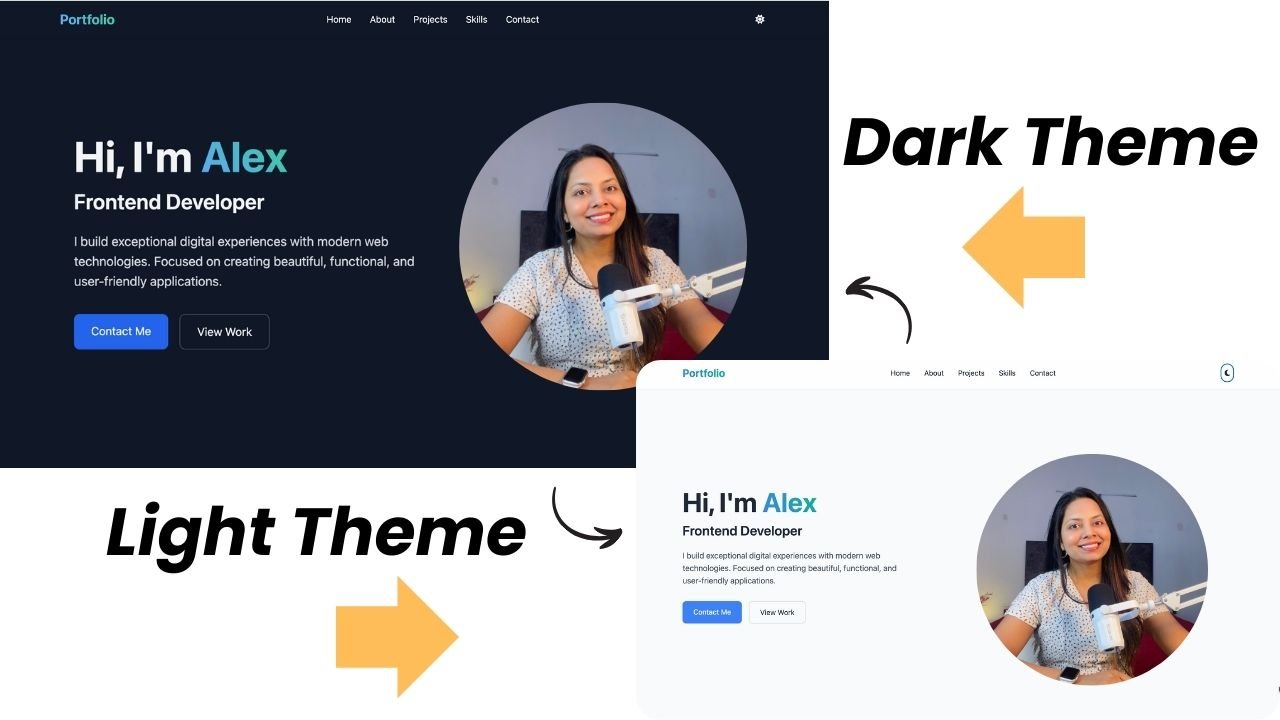
The Dark Light Theme Portfolio Website is a modern and responsive web template built using HTML, CSS, and JavaScript. This Portfolio Website is designed to showcase developer’s skills, projects experience, and professional information. It features a built-in theme switcher that allows visitors to switch between a clean light mode and an elegant dark mode while browsing the portfolio. The portfolio includes dedicated sections for Home, About, Projects, Skills, and Contact. You can use this to learn about the developer look at projects see what technical skills are available and find a way to send a message.
The theme-switching feature gives visitors a more personalized experience, while the responsive design ensures that the website looks and works well across desktops, tablets, and mobile devices. Because the Dark Light Theme Portfolio Website is so simple it is very easy for other developers or students to change the text, projects and skills to fit their lives.
Purpose of the Project
The purpose of the Dark Light Theme Portfolio Website is to provide a professional and visually flexible platform for showcasing personal information, skills, projects, and contact details. The website is designed to give visitors a clear view of the portfolio while also allowing them to choose between light and dark themes.
The theme switcher is a part of this Website because it makes the site feel more interactive. It lets visitors decide how the website looks. This way the Website is easy on the eyes on different lighting conditions and according to personal preferences.
The project also focuses on creating a clean and responsive portfolio experience using HTML, CSS, and JavaScript. Because the Dark Light Theme Portfolio Website has sections and is easy to change, this is great for students, coders or anyone, in a creative job who wants to show their work in a creative way.
How the Website Works
The website functions as a single‑page portfolio where visitors move through sections using the main navigation menu. The Home section introduces the portfolio, while the About section provides more information about the portfolio owner. Visitors can then explore the Projects section to view featured work and learn more, about the projects shown on the website. The Skills section lists the technologies and skills of the portfolio owner.
One of the main interactive features is the theme switcher. Visitors can toggle between dark modes while exploring the website. The chosen theme changes the look of the interface but keeps all content and navigation readable. Finally the Contact section offers visitors a way to reach out. Together these sections give visitors an tidy experience when exploring the portfolio.
Website Sections
- Home Section: This section first introduces to the portfolio and gives visitors a quick overview of the portfolio owner and their professional focus.
- About Section: It shows the portfolio owner in more detail. Visitors can learn about their background, skills, interests, and professional profile.
- Projects Section: This section shows the portfolio owner’s featured projects. Visitors can explore the displayed work and get an idea of the developer’s practical experience and capabilities.
- Skills Section: It presents the portfolio owner’s technical skills and areas of expertise. The organized layout makes it easy for visitors to identify the technologies and abilities highlighted in the portfolio.
- Contact Section: This section gives visitors a convenient way to get in touch with the portfolio owner. It can be used for professional inquiries, project discussions, or other communication.
Technologies Used
- HTML5: HTML5 creates the structure of the website and organizes different sections such as the Home, About, Projects, Skills, and Contact sections.
- CSS3: CSS3 controls the visual appearance of the portfolio. It controls the layout, typography, spacing, colors, responsive design, and the styles used for both light and dark themes.
- JavaScript: JavaScript adds interactive functionality to the website. It handles the theme switcher and other user interactions, allowing visitors to change between light and dark modes while browsing the portfolio.
Key Features
- Light and Dark Theme Switcher: The website lets visitors to switch between light and dark modes with a simple theme toggle. This gives users control over the appearance of the portfolio.
- Modern UI: This website uses a clean and sleek interface that keeps the portfolio information organized and easy to explore. Both themes maintain a professional appearance while providing different visual experiences.
- Responsive Design: The portfolio adapts to different screen sizes, allowing visitors to explore the website comfortably on desktops, tablets, and mobile devices.
- Smooth Navigation: Visitors can easily move between the Home, About, Projects, Skills, and Contact sections without any trouble by using the navigation menu.
- Project Showcase: The Projects section of this website gives you a place to look at the featured work. This section helps you see the work and the practical experience shown in the portfolio.
- Skills Display: This section organizes the portfolio owner’s technical abilities and makes it easier for visitors to understand their areas of expertise.
- Interactive Theme Switching: JavaScript handles the theme-switching functionality, allowing visitors to change the website from light mode to dark mode and back while staying on the same page.
- Clean Layout: The website uses a structured layout that presents important portfolio information without making the interface feel crowded.
- Easy Customization: The organized HTML, CSS, and JavaScript structure makes it easy to replace the existing content with personal information, projects, skills, and contact details.
Project Gallery


